01 / 05
1. Inventory the set and keep one quiet window
List the database, /etc/asterisk, /etc/astguiclient.conf, deployed astguiclient scripts, the actual web root, local customizations, certificate/key recovery and every required recording stage. Source checkout files alone do not contain deployed configuration.
Have the owner confirm a root-owned private backup base directory, encryption/storage policy and space for a new set. Preserve older sets under the existing retention policy. The commands below create a new mode 0700 run directory; they never reuse a prior filename.
Record table engines with the read-only query below. MyISAM data is not made consistent by --single-transaction. The write-quiescence window must cover both the database dump and the correlated file/media capture; resume work only in step4, after the owner checks both.
- Before you use it
- Use the verified read-only SQL client and actual database from Create a read-only database account for safe VICIdial queries.
SELECT ENGINE, COUNT(*) AS tables_in_engine FROM information_schema.TABLES WHERE TABLE_SCHEMA=DATABASE() GROUP BY ENGINE;This example has no recorded result here. Follow its preparation, expected result and stop conditions before using it.
- Success looks like
- Engine totals identify the consistency requirements to review with the owner.
- Stop if
- A wrong database, denied metadata read or uncertain engine means stop before the dump.
You should seeThe inventory, quiet-window owner, database privileges and private destination are known before writing anything.
02 / 05
Try the failure guard locally before a maintenance window
This temporary-directory exercise creates fictional text, runs a child producer that fails and checks that a previous accepted file remains unchanged. It does not connect to a database, run mariadb-dump, copy PBX files or restore a system.
- Before you use it
- Run locally with Python 3 and a standard sh. The temporary files are invented and owned by this exercise.
python3 - <<'PYMODEL'import hashlib, os, pathlib, subprocess, tempfilewith tempfile.TemporaryDirectory(prefix="vicigeek-backup-model-") as parent: root=pathlib.Path(parent); prior=root/"prior"; prior.mkdir(mode=0o700) old=prior/"database.sql"; old.write_text("fictional previous accepted backup\n") digest=lambda p: hashlib.sha256(p.read_bytes()).hexdigest() before=digest(old) run=pathlib.Path(tempfile.mkdtemp(prefix="new-run-",dir=root)); os.chmod(run,0o700) partial=run/"database.sql.incomplete" with partial.open("xb") as out: result=subprocess.run(["sh","-c","printf 'fictional partial output\\n'; exit 7"],stdout=out,check=False) if result.returncode==0: raise AssertionError("failure fixture unexpectedly succeeded") assert digest(old)==before assert partial.exists() and not (run/"database.sql").exists() assert run.stat().st_mode & 0o777 == 0o700 print("PASS producer failure returned 7 to its caller") print("PASS previous accepted backup hash unchanged") print("PASS new private run retains incomplete artifact; no final database.sql")print("Local fabricated filesystem model only; no database, PBX or restore used.")PYMODELCaptured local fixture result · 2026-11-07T20:34:54.841490+00:00. Any filtering, hidden values or test-only data are identified in the capture label. Select Replay transcript to read the recorded output.
- Success looks like
- The failed child returns7, the previous hash is unchanged, and the new private run has only an incomplete artifact.
- Stop if
- A failed assertion means the model is unaccepted. This local result cannot qualify the real database, file inventory or restore.
Actual local fixture execution with fictional input. No VICIdial, database, carrier or provider operation.
Steps and result3 steps
Local fictional filesystem/producer-failure model only;no database dump,PBX,restore or recoverability test. Actual localhost browser capture,November7,2026;fixed source command executed by Run fixture. Video/still include ViciGeek attribution;this is not native VICIdial UI.
Observed local fixture resultProducer exit7;previous hash unchanged;incomplete artifact retained.
Read the chapter notes
- Local fictional scope
Actual local fixture execution with fictional input. No VICIdial, database, carrier or provider operation.
- Click Run fixture
Producer exit7;previous hash unchanged;incomplete artifact retained.
- Actual stdout and model limits
Producer exit7;previous hash unchanged;incomplete artifact retained.
2026-11-07T20:34:54.841490+00:00 · Local Python fixture / actual browser run. local filesystem producer failure only Use fullscreen to read the actual local inputs and results.
View a still screenshot
Observed local fictional model
Open to enlarge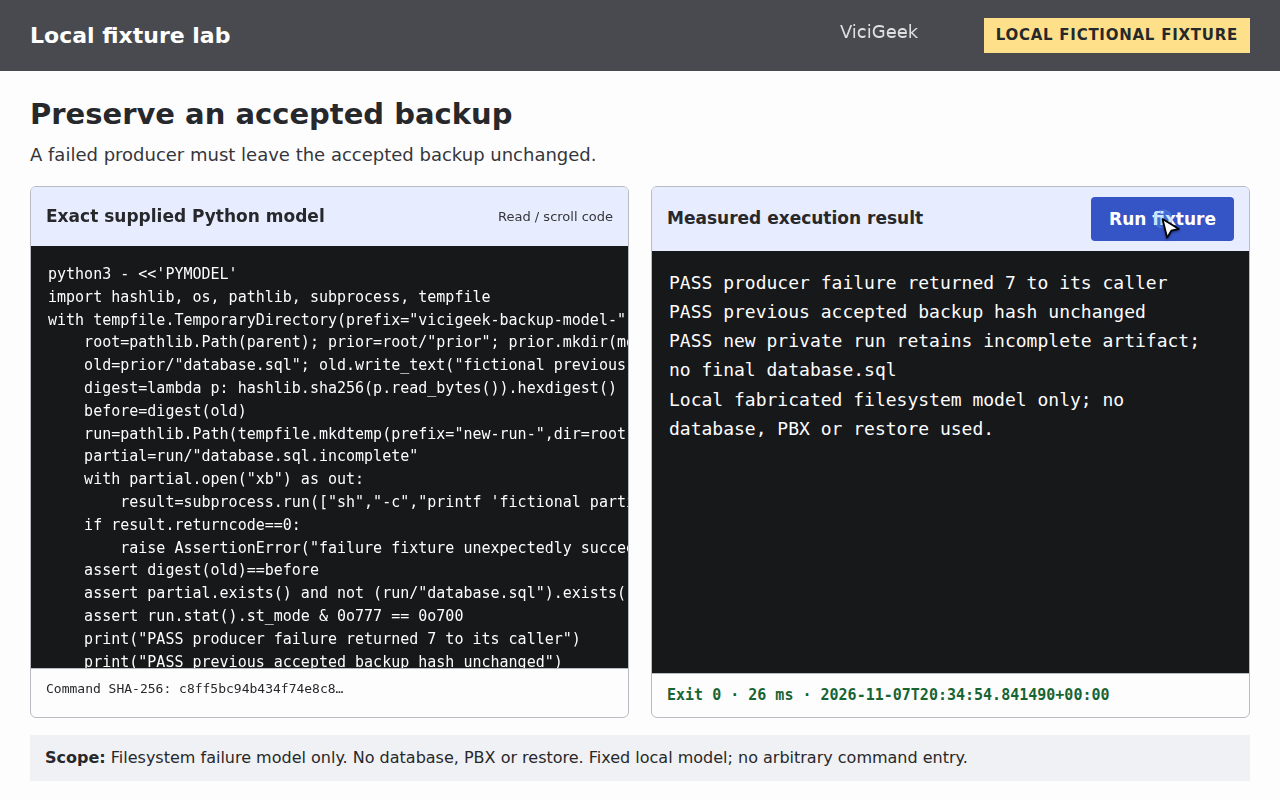
Capture details
Local fictional filesystem/producer-failure model only; no database dump,PBX,restore or recoverability test. The Run fixture action executed the exact adjacent command; its exit code and stdout were retained. This is a local model interface, not native VICIdial UI.You should seeYou have tested local failure/preservation behavior while keeping real backup acceptance separate.
03 / 05
2. Run one reviewed database-and-files capture script
In a new private review directory, save this complete block as capture-backup.sh using your editor. Replace the database/account, backup base and full file inventory before review. Run it as a child process with bash ./capture-backup.sh from the authorized root maintenance context. Do not source it or paste its exit statements directly into an interactive SSH shell.
The script creates a fresh mode 0700 run directory atomically and keeps BACKUP_RUN inside that one process for both captures. A producer failure leaves an incomplete artifact, exits the child script and leaves earlier accepted sets untouched. The owner still follows the approved abort/resume runbook.
Keep writes quiesced for the entire script. Its final successful checks establish only the selected local artifacts, not an import, a restored service or copied media on another host. Record the printed run path privately for step3.
- Before you use it
- Save the entire block as a new private script; review its substitutions and file inventory. Run bash ./capture-backup.sh only in the approved root quiet window. Its exit statements terminate the script, not your SSH shell.
#!/usr/bin/env bashset -uumask 077BACKUP_BASE='/secure/backup'test -d "$BACKUP_BASE" && test ! -L "$BACKUP_BASE" || exit 1test "$(stat -c '%U:%a' "$BACKUP_BASE")" = 'root:700' || { printf '%s\n' 'STOP: owner must verify the private backup base.' >&2; exit 1;}BACKUP_RUN=$(mktemp -d "$BACKUP_BASE/vicidial-$(date -u +%Y%m%dT%H%M%SZ).XXXXXXXX") || exit 1printf 'Private run directory: %s\n' "$BACKUP_RUN"if mariadb-dump --user=backup --password --lock-all-tables --routines --events \ --databases YOUR_DATABASE > "$BACKUP_RUN/database.sql.incomplete"; then test -s "$BACKUP_RUN/database.sql.incomplete" || { printf '%s\n' 'STOP: empty dump; keep this incomplete set for review.' >&2; exit 1; } mv -- "$BACKUP_RUN/database.sql.incomplete" "$BACKUP_RUN/database.sql" || exit 1else printf '%s\n' 'STOP: dump failed; no final database.sql was accepted.' >&2 exit 1fi test -n "${BACKUP_RUN:-}" && test -d "$BACKUP_RUN" && test -s "$BACKUP_RUN/database.sql" || exit 1test ! -e "$BACKUP_RUN/files.tar.gz" && test ! -e "$BACKUP_RUN/files.tar.gz.incomplete" || exit 1if tar -C / -czf "$BACKUP_RUN/files.tar.gz.incomplete" -- \ etc/asterisk etc/astguiclient.conf usr/share/astguiclient \ srv/www/htdocs usr/src/astguiclient/trunk \ var/spool/asterisk/monitor var/spool/asterisk/monitorDONE; then gzip -t "$BACKUP_RUN/files.tar.gz.incomplete" && \ tar -tzf "$BACKUP_RUN/files.tar.gz.incomplete" > /dev/null || exit 1 mv -- "$BACKUP_RUN/files.tar.gz.incomplete" "$BACKUP_RUN/files.tar.gz" || exit 1else printf '%s\n' 'STOP: required file capture failed; retain the incomplete set.' >&2; exit 1fi(cd "$BACKUP_RUN" && sha256sum database.sql files.tar.gz > SHA256SUMS && sha256sum -c SHA256SUMS) || exit 1This example has no recorded result here. Follow its preparation, expected result and stop conditions before using it.
- Success looks like
- One new private run contains database.sql, files.tar.gz and SHA256SUMS after both producer/integrity checks. Earlier sets are not reused.
- Stop if
- A nonzero child-script exit or incomplete artifact blocks maintenance. Preserve that set privately, keep the previous accepted set and ask the owner to apply the approved abort/resume procedure.
You should seeBoth captures finish inside one process and quiet window, or that attempt stops with an explicitly incomplete set.
04 / 05
3. Review the exact accepted set and independent copy
The script in step2 already captures the approved file inventory before the quiet window ends. Do not run a second archive command against an earlier directory.
Use the exact private run path printed by the script, then run this read-only check in its own subshell. Parentheses keep an error exit local to this check. Review the inventory and copy the accepted set to the approved independent encrypted destination; verify hashes there too.
The database is an uncompressed .sql file; gzip -t applies to files.tar.gz, not database.sql. A readable archive and matching hash remain artifact checks rather than a recovery result.
- Before you use it
- Replace only the path with the new run recorded privately from the child script. This parenthesized block reads accepted artifacts only.
( BACKUP_RUN='/REPLACE/WITH/THE/EXACT/NEW/RUN' test -d "$BACKUP_RUN" || exit 1 cd "$BACKUP_RUN" || exit 1 test -s database.sql && test -s files.tar.gz && test -s SHA256SUMS || exit 1 sha256sum -c SHA256SUMS && gzip -t files.tar.gz && tar -tzf files.tar.gz > /dev/null)This example has no recorded result here. Follow its preparation, expected result and stop conditions before using it.
- Success looks like
- Both checksum checks return OK and archive checks exit 0; repeat checksum verification on the approved independent copy.
- Stop if
- A missing final artifact, failed hash or read-through blocks reliance on the set. Do not rename an incomplete file to make the check pass.
You should seeThe correlated database and file artifacts have a known scope and matching private manifest.
05 / 05
4. Verify, resume through the runbook and record the boundary
- Record the run directory privately, UTC database/file capture interval, versions, inventory, hashes and independent-destination verification.
- Ask the owner to confirm application writes and normal operation resume through the approved runbook, including the abort branch if a capture failed.
- Before relying on this set for recovery, perform a separately approved isolated restore drill. Do not overwrite production to test it.
- Keep older accepted sets until retention policy permits removal. An incomplete failed set does not replace the last good one.
You should seeYou have a private, scoped new artifact set and a documented restore boundary, or a preserved failed attempt with the previous accepted set intact.
Checks and sources
What was checked
- The new backup commands are prospective and were not run against a customer database or PBX for this repair.
- The historical compressed-file check is not evidence for these changed commands and is not reused as their output.
- A local fabricated-data failure model may demonstrate preservation of an earlier file; that is filesystem behavior only, not database consistency or recovery.
- The exact local fictional model command was executed through the recorded browser on November 7, 2026; command/stdout hashes and exit 0 match the capture provenance. This establishes only the model scope stated beside that exercise.
Primary references
Sources
- mariadb-dump referenceMariaDB · accessed November 4, 2026
- MariaDB backup overviewMariaDB · accessed November 4, 2026
- Bash output redirectionGNU · accessed November 7, 2026