01 / 04
Open User Stats
Use an administrator account with report access. The learner1 agent account may not be allowed to view reports.
- In VICIdial Admin, open Reports.
- Under Agent Reports, choose User Stats.
Find the agent reports
Open to enlarge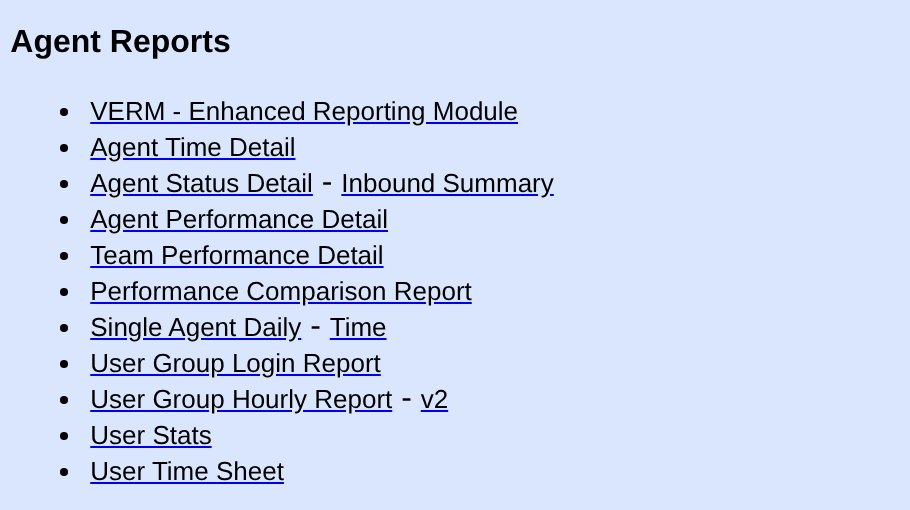
You should seeThe User Stats report opens.
02 / 04
Choose the date and agent
Use the date of your practice call in the server’s reporting time zone.
Use the date format shown by the installed report and the actual practice-call date, not the date of the example screenshot.
On the captured User Stats page, learner1 is already selected in the page URL and its user field is hidden. The general report can instead show a User input. Call status is an optional exact disposition code: leave it empty for any status; do not type ALL.
- Enter the actual practice-call date in both date boxes using the format shown by the report.
- If User is visible, enter learner1; otherwise confirm that User Stats was opened for learner1 from the user’s record.
- Leave Call status empty to include all statuses, then select submit.
- In the individual outbound-call rows, compare DATE/TIME, CAMPAIGN LAB01, LIST 90001, LEAD and STATUS with your notes.
- First date and date after “to”
- The practice call date in both boxes
- User
- learner1Enter only when visible; a user-specific page carries the selected user in its URL.
- Call status
- Leave empty
Steps and result5 steps
Actual VICIdial form entry with fictional examples. The recording stops before saving; follow the field notes for deployment-specific values.
Entry shownThe native User Stats page for synthetic agent learner1 shows example date and Call status inputs. The user is selected by the page URL, not typed into this form. No report was submitted and no call result was demonstrated.
Read the chapter notes
- Actual VICIdial form — not submitted
The native User Stats page for synthetic agent learner1 shows example date and Call status inputs. The user is selected by the page URL, not typed into this form. No report was submitted and no call result was demonstrated.
- Set the reporting dates
Both dates use the fictional reporting window 2026-11-04. Use the date range and report time zone of your own known test event.
- Optionally filter by an exact status
The page was opened for synthetic agent learner1. Its user is carried in the URL and hidden form input. SALE illustrates an exact disposition filter; it does not demonstrate a saved sale or call.
- Leave Call status empty for any status
Clear the optional status input to include any disposition. ALL would be treated as a literal status code on this revision. No report is submitted.
- Review before any real save
The native User Stats page for synthetic agent learner1 shows example date and Call status inputs. The user is selected by the page URL, not typed into this form. No report was submitted and no call result was demonstrated.
November 4, 2026 · VICIdial Admin 2.14-969a build 261102-0125. The native User Stats page for synthetic agent learner1 shows example date and Call status inputs. The user is selected by the page URL, not typed into this form. No report was submitted and no call result was demonstrated. ViciGeek attribution is encoded in the video and poster. Use fullscreen to read the original field labels.
View a still screenshot
Enter User Stats filters
Open to enlarge
Capture details
Call status is empty for any status; a nonempty value is an exact disposition filter. No report was submitted and no call or report row was demonstrated. Actual browser capture, November 4, 2026; Admin 2.14-969a build 261102-0125.You should seeAfter you submit in your own lab, the report shows available activity for the selected user and dates. This recording only fills filters; it does not submit a report or demonstrate a call row.
03 / 04
Find the individual outbound call
Agent Talk Time and Status gives totals. Scroll farther down to Outbound Calls for this Time Period to find individual calls.
The image shows blank report column headings; it is not a recording of a completed practice call.
- Find the row whose DATE/TIME matches your practice notes.
- Check CAMPAIGN is LAB01, LIST is 90001 and LEAD matches the lead ID you wrote down.
- Compare STATUS with the disposition code you saved after hanging up. LENGTH is the reported call duration; it does not prove that Echo was audible.
The matching saved report—with its unresolved duration
Open to enlarge
Capture details
HANGUP REASON is AGENT. Zero reported duration remains a failed acceptance check despite the matching identity/status.You should seeAfter your own completed and dispositioned practice call, look for one outbound row matching the time, campaign, list, lead and saved status. A matching row is a report of that call; it does not prove that Echo was audible.
04 / 04
If the record is missing
If the row is missing, use the practice date in both date boxes, learner1 in the user box and an empty Call status filter. Check the date in the server’s reporting time zone and confirm you submitted the disposition.
If Outbound Calls for this Time Period is absent, sign in with the administrator account used in lesson 4 and reopen User Stats. A user/day total alone cannot identify the particular practice call.
If the row exists but duration looks wrong, preserve it and compare vicidial_log start/end/length against the agent log and dial timestamp for that exact lead. In this exercise vicidial_log has equal start/end epochs and agent talk_sec 9; the cause remains unverified. Do not reset or delete records to make them agree.
Checks and sources
What was checked
- The November 6, 2026 native User Stats screenshot is an actual saved synthetic row: learner1, LAB01, LABTEAM, list 90001, lead 99991714, status HUNGUP, hangup reason AGENT.
- Its reported LENGTH is 0 while the matching agent log has talk_sec 9. The equal vicidial_log start/end epochs explain the arithmetic zero; the underlying cause was not established. This is not a clean duration or call-quality pass.
Primary references
Sources
- VICIdial official source snapshotsVICIdial Group · accessed November 3, 2026
- VICIdial official demoVICIdial Group · accessed November 3, 2026