What the real run established
The full sequence below was exercised once in the approved lab. It reached the synthetic preview, an internal call attempt, a saved HUNGUP disposition and a matching report row. Two limits remain visible: the audio check was instrumented, and reported call duration was 0 despite 9 seconds in the agent log. Treat this as a documented attempt with an unresolved reporting check, not an unconditional success example.
- Fixture
- learner1 · 8001 · LAB01 · 90001 · lead 99991714
- Dial log
- 2026-11-06 17:23:02 server time · 19001001 · default
- Saved report
- 2026-11-06 17:23:11 server time ·HUNGUP ·LENGTH 0
- Duration cross-check
- vicidial_log start_epoch=end_epoch=1794003791; agent log talk_sec=9
- Audio observation
- Received 523 Hz tone in 4/30 analysis frames; no human hearing or sustained-quality claim
You should seeThe configuration and saved-outcome steps are demonstrated. Clean duration acceptance remains unresolved; the evidence does not justify a fully passed call-quality claim.
1. Pass the preflight before activating LAB01
The initial inspection found Manual Dial List ID 998 and no 19001001 route. The approved run corrected those prerequisites before activation. The fixture was subsequently rolled back, so a reader must still perform these checks against the current installation rather than assume the screenshot is live state.
Use the same identifiers throughout the exercise. The intended route is no prefix + phone_code 1 + phone_number 9001001 = 19001001. The old Dial Prefix 9 would request different digits.
You should seeIf any check fails, leave Active N. Continue only after every actual saved setting and route check passes.
Fix the two list relationships
Prepare and inspect the internal route
- List90001 belongs to LAB01, Active Y, and contains exactly the three intended synthetic records.
- LAB01: MANUAL, Auto Dial Level 0, PREVIEW_AND_SKIP, Dial Prefix x, empty Manual Dial Prefix, Omit Phone Code N, Manual Dial List ID 90001, Pause After Each Call Y.
- Run the effective 19001001@default dialplan check in Prepare the internal practice destination and confirm local Answer/Echo/Hangup without a matching provider route.
- learner1 belongs to LABTEAM with only LAB01 allowed; station 8001 is saved with matching transport/template and private credentials.
- The local call-time setting permits this synthetic exercise, and your call worksheet is ready.
2. Confirm a paused, connected agent session
If you just completed lesson10, keep that same session open and PAUSED; do not log in again or replace it. If you entered this guide directly, use the activation/login steps below after all preflight checks pass.
- Confirm LAB01 is Active Y only after preflight passes. If it is still inactive, complete the activation gate in the agent-login lesson, save and reopen it before logging in.
- Open the Agent login in its own tab, enter station 8001 and its Login Password, then learner1 and the separate agent password; choose LAB01.
- Allow the course webphone pop-up and microphone access. Wait for the phone’s Registered state and the agent conference connection. Stay PAUSED.
- If the browser shows Registration Failed, a certificate warning, no phone panel or no conference connection, stop here. An Agent page loading is not proof that the phone works.
The course webphone connected to its conference
Open to enlarge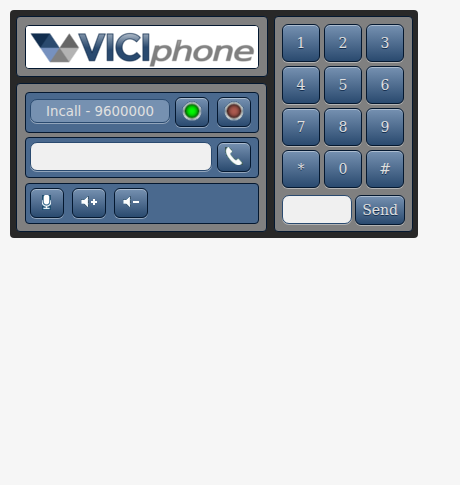
Capture details
This precedes the Echo attempt and is not proof that the synthetic destination has answered.You should seeThe course station is registered and connected to the agent session while the agent remains PAUSED.
3. Preview exactly one synthetic lead
DIAL NEXT NUMBER can immediately dial when preview is off. In this exercise first confirm LEAD PREVIEW is checked and the saved campaign preview mode is PREVIEW_AND_SKIP.
- Select DIAL NEXT NUMBER once and wait for the preview.
- Read the contact: Test One, Test Two or Test Three; number 9001001; phone code 1; list 90001. Copy its lead ID into the worksheet.
- If another contact appears, use SKIP LEAD and stop. Recheck campaign/list eligibility; do not call it.
- When every field matches and the route remains approved, select DIAL LEAD once. Record the server time and the displayed result.
The actual synthetic preview
Open to enlarge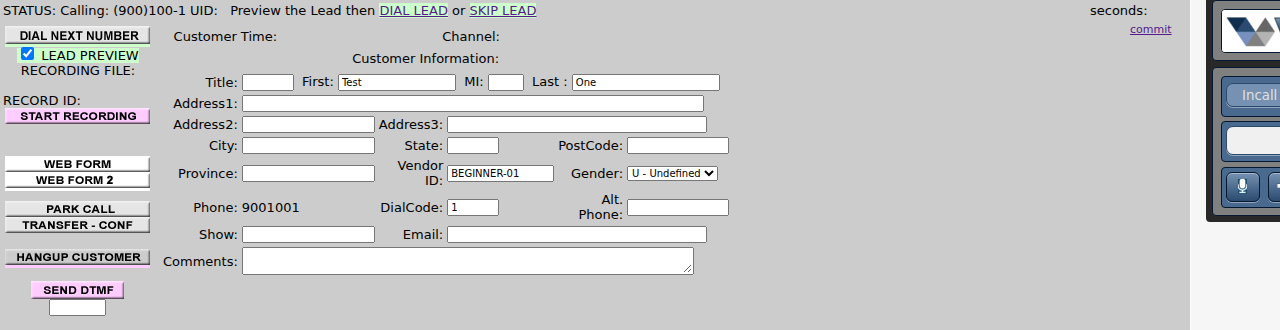
Capture details
Native viewport was scrolled to exclude the private session header/server footer; no values or pixels were redrawn.You should seeThe approved run previewed Test One, lead 99991714, before DIAL LEAD. Match your own saved fixture before starting the single internal attempt.
4. Test the audio and save what actually happened
For the captured run, a generated 523 Hz tone was fed to the browser microphone and measured only on the verified received audio track. It appeared in 4 of 30 analysis frames after setup transients; baseline and after-hangup readings were silent. A person did not perform a listening test. Follow the headset steps below for your own audible check.
- When the call answers, speak a short unique phrase such as “Lab audio check one two three”. Listen for that phrase returning in the headset. Avoid pressing#; Echo exits on that key.
- Record whether your own voice returned clearly, returned with a fault, or did not return. A connected timer or moving audio meter alone does not pass this listening test.
- Select HANGUP CUSTOMER. Choose an available outcome describing the actual result. The captured exercise used HUNGUP - HUNG UP, which records the deliberate hangup without claiming a sale or audio success; record its exact code, then SUBMIT.
- Wait for the Agent screen to return to PAUSED. If the disposition form remains or shows an error, the saved-outcome check has not passed.
Choose the actual outcome, then submit
Open to enlarge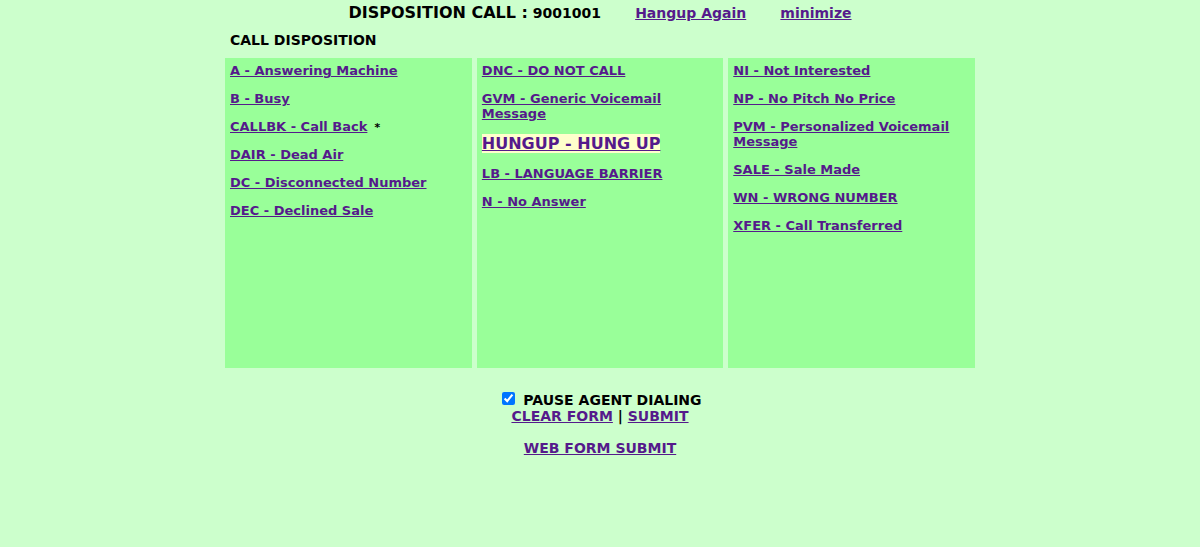
The screen during the internal attempt
Open to enlarge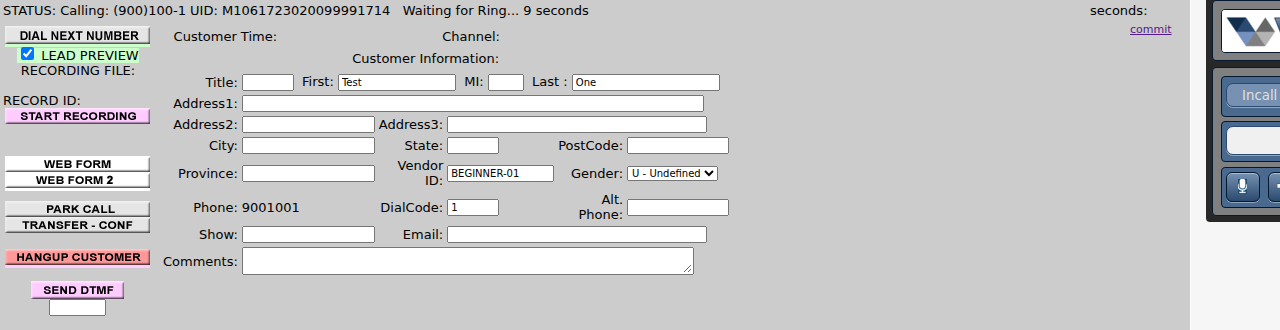
Capture details
Returned-media measurements are separate evidence; this screenshot alone does not prove an answered or audible call.You should seeThe attempt has an observed audio outcome and a submitted disposition. Hearing Echo verifies this internal browser-to-Asterisk media path; it does not test a carrier.
5. Close the loop with the saved report
The captured report row matches the synthetic lead and HUNGUP status, but LENGTH is 0. Read-only inspection confirms start_epoch and end_epoch are both 1794003791 in vicidial_log. The corresponding agent log has talk_sec 9 and the dial log records 19001001 at 17:23:02. Those facts explain the displayed zero arithmetically; they do not establish the cause of the discrepancy. Do not rewrite or reset the records to make the result look successful.
- Open Reports → Agent Reports → User Stats for learner1 and a date range including the recorded server time.
- Find Outbound Calls for this Time Period. Match LAB01, list 90001, the noted lead ID, call time and exact status code.
- Record the report’s duration as reported. A nonzero duration without the listening observation does not prove usable audio.
- If no matching row appears, check server date/time and report range first, then the lead ID and disposition submission. Preserve the attempt notes; do not place more calls merely to produce a row.
The matching saved report—with its unresolved duration
Open to enlarge
Capture details
HANGUP REASON is AGENT. Zero reported duration remains a failed acceptance check despite the matching identity/status.You should seeThe saved identity and HUNGUP status match this attempt. Because duration disagrees with the agent log, the captured run leaves that acceptance check unresolved.
6. Keep a compact evidence record
- Before you use it
- Record observations for one attempt. Do not include passwords, real contacts or unrelated session details.
Environment/build: __________Campaign/list/station/agent: LAB01 /90001 /8001 /learner1Effective internal route checked at: __________Lead ID and preview identity: __________Server start time: __________Registered + conference connected: yes / noHeard my returned phrase: clear / faulty / noHangup completed: yes / noDisposition code submitted: __________Report row: campaign / list / lead / time / status __________First unmet gate, if any: __________- Success looks like
- The same lead/time/status connect the preview, heard audio, saved disposition and report row.
- Stop if
- If a gate fails, record that failure and follow its branch below rather than inventing a completed result.
7. Follow the first failed observation
- No eligible lead: verify list 90001 Active Y/Campaign LAB01 and each synthetic lead status; verify NEW is a campaign dial status and Local Call Time allows the lead’s time zone. Then inspect the hopper using the not-dialing guide. Do not repeatedly click or raise Auto Dial Level.
- No registration: check the browser’s HTTPS trust, microphone permission, secure WebSocket connection and separate registration password, then the server’s generated SIP peer. Use the phone prerequisite recipe.
- Route missing or wrong digits: hang up if an attempt started, set LAB01 inactive and compare prefix/phone-code/number with the effective dialplan. A carrier configuration is not the fix for this internal exercise.
- Call answers but you hear no Echo: hang up and record the silent result. Check selected headset/microphone, mute and permission. Next compare browser WebRTC connection/media observations with the server; follow the one-way-audio guide before another attempt.
- Hangup completes but disposition does not save: keep the page open, read the actual error, and check session connection. Preserve lead ID/time; verify the report before retrying submission or calling again.
- Matching row but LENGTH 0: preserve the record and compare the exact lead’s vicidial_log start/end/length with the agent log and dial timestamp. The captured run has equal call-log epochs and talk_sec 9 in the agent log; the cause was not established. Do not infer successful duration from the UI timer or place a second call just to improve the report.
8. Leave the fixture in a known state
- Log out learner1 and close its webphone after the saved-outcome check. Do not log out another agent.
- Set only LAB01 Active N and reopen to confirm. Keep the synthetic call and disposition history.
- If this was a temporary setup change, restore the exact campaign fields and custom route from your before-copy using the rollback steps in Prepare the internal practice destination. Disable unused course user/phone records instead of deleting evidence.
You should seeThe practice campaign is inactive, your session is closed, and the evidence record identifies either a passed exercise or the exact unfinished gate.
Checks and sources
What was checked
- One approved internal attempt was performed on November 6, 2026 using learner1, SIP station 8001, LAB01/list 90001 and synthetic lead 99991714. Native evidence covers the saved prerequisites, lead preview, connected agent conference, during-attempt screen, HUNGUP selection and matching User Stats row.
- Instrumented 523 Hz microphone input was compared against the received WebRTC audio track, independently matched to a peer-connection receiver and not a sender. Baseline and after-hangup measurements were silent; the expected tone appeared in 4 of 30 during-attempt analysis frames. This is limited returned-media evidence, not a human listening test or sustained audio-quality pass.
- The User Stats row reports LENGTH 0. Independent vicidial_log start_epoch and end_epoch are equal, while the agent log records talk_sec 9. The difference remains unresolved, so this run does not pass clean duration acceptance. No second call or outside call was made.
- Afterward the prior campaign and custom dialplan values were restored, the new user/phone disabled, the template unassigned and course group access removed. The synthetic call and disposition history were retained.
Primary references
Sources
- VICIdial official source snapshotsVICIdial Group · accessed November 3, 2026
- VICIdial official demoVICIdial Group · accessed November 3, 2026
- Echo application behavior (Asterisk 20 reference; installed18 help also inspected)Asterisk · accessed November 6, 2026