01 / 04
Download the practice file
Download this CSV: a small text file containing three fictional contacts. It has three rows and no header row, so every row can be loaded as a lead. All three use the same internal number.
- Before you use it
- Compare the downloaded file with this worksheet.
9001001,1,Test,One,BEGINNER-019001001,1,Test,Two,BEGINNER-029001001,1,Test,Three,BEGINNER-03- Success looks like
- There are five columns and exactly three data rows.
- Stop if
- If the contents differ, stop and obtain the correct file before loading.
02 / 04
Choose the lab list and map fields
A list holds the contacts a campaign can call. This upload goes only into your practice list. These settings are specific to the fifth-generation loader and this no-header file of three fictional contacts sharing one internal destination.
- In VICIdial Admin, open Lists → Load New Leads.
- Choose the downloaded CSV file. Set List ID Override to 90001 and Phone Code Override to Load from Lead File. Choose Custom layout and set Attempt column auto-detection to No.
- For this synthetic file, select NO DUPLICATE CHECK, NO USACAN VALID CHECK and DISABLED for Required Phone Number Length. Select SUBMIT to open the mapping screen.
- Map the five columns using the list below. Review the preview and choose OK TO PROCESS once. If the three records already exist, inspect them instead of importing again.
- List ID Override
- 90001
- Phone Code Override
- Load from Lead FileMakes the Phone Code column available on the mapping screen.
- File layout to use
- Custom layout
- Attempt column auto-detection
- No
- Lead Duplicate Check
- NO DUPLICATE CHECKOnly for these three lab records, which share one internal number.
- USA-Canada Check
- NO USACAN VALID CHECKFor this approved internal seven-digit lab destination.
- Required Phone Number Length
- DISABLEDThe recorded practice-file setting, not a production policy.
- Column 1
- Phone Number9001001
- Column 2
- Phone Code1
- Column 3
- First NameTest
- Column 4
- Last NameOne, Two or Three
- Column 5
- Vendor Lead CodeBEGINNER-01, BEGINNER-02 or BEGINNER-03
Steps and result17 steps
Follow the real file selection, list override, five column mappings, OK TO PROCESS, Load Summary, list count and a saved lead.
Observed resultThe real Load Summary reports Good 3, Bad 0, Total 3. List 90001 contains the three fictional contacts, and the saved record fields were checked. No call was placed.
Read the chapter notes
- Open the actual lead loader
This recording uses the fifth-generation VICIdial loader and the downloadable three-row practice CSV.
- Choose the practice CSV
Select the real three-row practice file. It has no header row and contains only fictional records.
- List ID Override → 90001
Select 90001 - Practice list. Its Campaign is LAB01, which remains inactive.
- Read Phone Code from the file
Select Load from Lead File for Phone Code Override so the CSV’s second column can be mapped.
- Choose Custom layout
Select Custom layout and No for automatic column detection.
- Set the synthetic-lab checks
For this file only: NO DUPLICATE CHECK, NO USACAN VALID CHECK and disabled phone-length checking. All three fictional contacts share one internal number.
- Upload and inspect the columns
Click SUBMIT to upload the CSV and open the real mapping screen.
- Vendor Lead Code → column 5
Select the preview value BEGINNER-01 for Vendor Lead Code.
- Phone Number and Phone Code
Map Phone Number to 9001001 from column 1, then Phone Code to 1 from column 2.
- First Name and Last Name
Map First Name to Test from column 3 and Last Name to One from column 4.
- Review before processing
Check the mapped values. The file has no header row to skip, and the destination list is 90001.
- Click OK TO PROCESS once
Submit the mapped file once to insert the synthetic records.
- Read the real loader result
Inspect the actual inserted, rejected and duplicate counts before leaving the result screen.
- Confirm list 90001 in LAB01
Reopen the actual list and check Campaign LAB01 and Active Y.
- Click the real lead count: 3
The saved list contains three leads. Click its count to open the filtered search.
- Inspect the saved fictional leads
The filtered search shows Test One, Test Two and Test Three in list 90001.
- Open an actual saved lead
Check the record’s list, number, phone code, name and vendor code. These are persisted values, not an illustration.
November 4, 2026 · VICIdial Admin 2.14-969a · SVN 4037. Synthetic lab records; campaign LAB01 stays inactive. ViciGeek watermark is burned into the recording. Use fullscreen to read the original field labels.
View a still screenshot
Find Load New Leads
Open to enlarge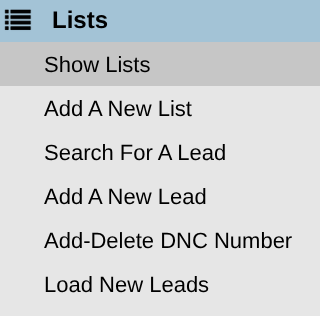
You should seeThe recorded first load returned Good 3, Bad 0, Total 3. Your own first load should report three accepted leads; the file has no header row to skip. If counts differ, inspect the existing records and loader result before retrying.
03 / 04
Check the loaded records
A lead is one contact record. Check the records before making a call.
- Open Lists → Show Lists and select list 90001. Click its lead count to open the filtered lead search, as shown in the recording.
- Open each result and compare its name, vendor lead code, phone number and phone code.
- Write down each lead ID. Confirm list 90001 is active in LAB01.
Steps and result4 steps
Actual native VICIdial controls, filled with example values in the browser. This recording stops before submission. Use the field notes to distinguish lab fixtures, missing prerequisites and deployment-specific values.
Entry shownOnly native lead-search inputs were filled with synthetic practice values. No search was submitted, and this recording does not demonstrate returned or matching lead rows.
Read the chapter notes
- Actual native form — not submitted
Only native lead-search inputs were filled with synthetic practice values. No search was submitted, and this recording does not demonstrate returned or matching lead rows.
- Use the practice CSV vendor code
The vendor code comes from the downloadable synthetic practice CSV. It is not a real customer identity.
- Scope to the practice list
List ID 90001 is the saved practice list. This search is not submitted and no matching result is claimed.
- Review the unsaved example
Only native lead-search inputs were filled with synthetic practice values. No search was submitted, and this recording does not demonstrate returned or matching lead rows.
November 4, 2026 · VICIdial Admin 2.14-969a build 261102-0125. Only native lead-search inputs were filled with synthetic practice values. No search was submitted, and this recording does not demonstrate returned or matching lead rows. ViciGeek attribution is encoded in the video and poster. Use fullscreen to read the original field labels.
View a still screenshot
Enter practice lead search filters
Open to enlarge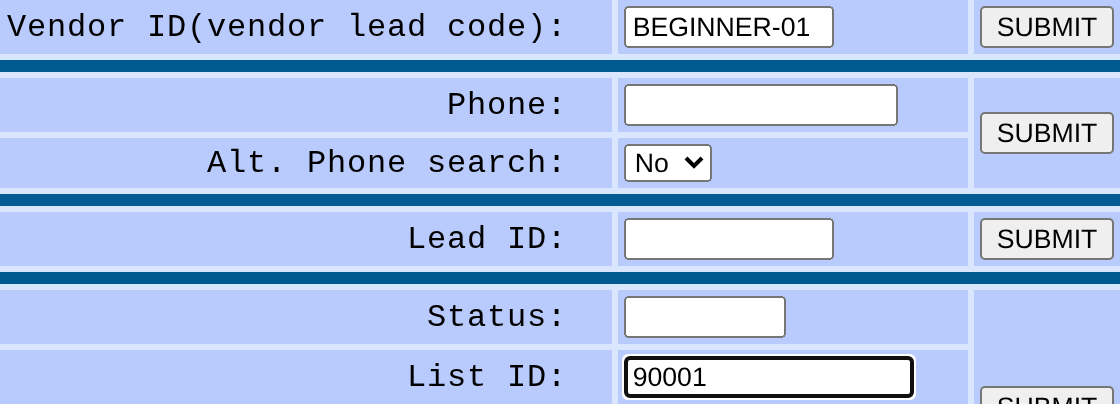
Capture details
Only inputs are shown. This crop does not establish a combined query or its matching rules, and no search was submitted. Use returned authorized rows to verify the separate saved import. Actual browser capture, November 4, 2026; VICIdial Admin 2.14-969a build 261102-0125.You should seeThe earlier completed import recording shows three fictional practice leads. The separate unsent search-form illustration does not verify a search or current records. On your system, compare each result’s phone number 9001001, phone code 1 and NEW status before continuing.
04 / 04
If the count or fields do not match
If the count differs from three, read the import result and inspect the existing records with List ID 90001 before uploading again. Duplicate checking is disabled for this file, so repeating the upload can add the same records twice.
Primary references
Sources
- VICIdial official source snapshotsVICIdial Group · accessed November 3, 2026
- VICIdial official demoVICIdial Group · accessed November 3, 2026